Solara software · Sales commissions
SolaraCom tracks the revenue invoiced, collected and settled by each salesperson, organises collection reminders and calculates the commissions due once the invoice is paid in full, passed on to Solara RH payroll.
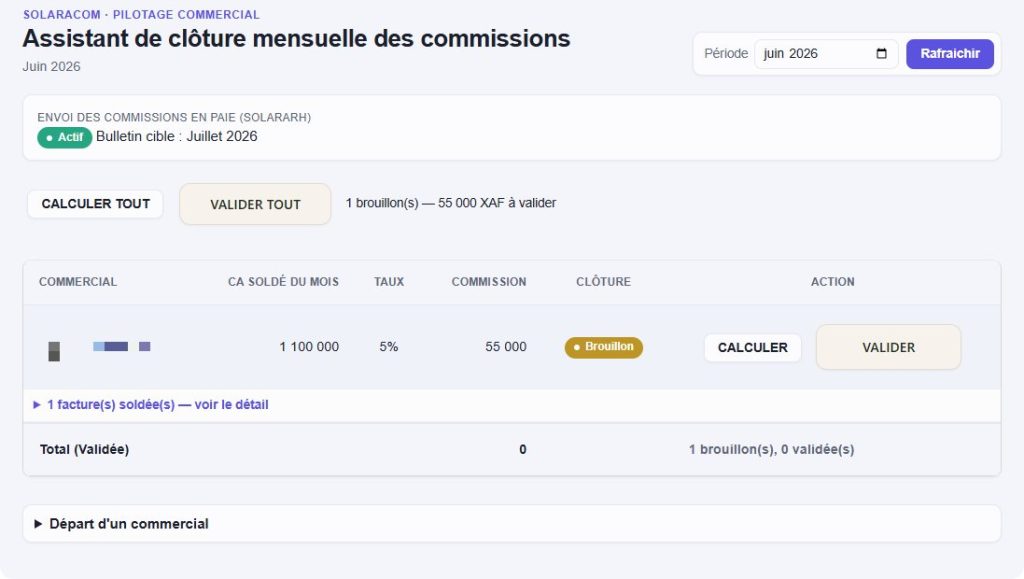
Commission close assistant. Real screenshot, salesperson’s name hidden.
Credit sales, partial payments, month-end disputes: SolaraCom brings order between what is invoiced, what is paid and what is owed.
Commission is only due once the invoice is paid in full, with no pro rata; every amount links back to its settled invoices.
Outstanding balance per customer, aged balance and a daily work list with calls, visits, payment promises and disputes.
Locked monthly close, PDF commission statement and transfer to payroll in Solara RH.
From customer portfolio to payslip.
Revenue invoiced, collected and settled, month by month.
Assigning and transferring customers, including in bulk when someone leaves.
Monthly to annual targets and bonus tiers, compared with actual results.
Aged balance, payment promises, disputes and assisted WhatsApp messages.
Calculation, review and validation of commissions, one by one or in bulk.
Entries, balance and capped advances, authorised by management.
Receipt books per salesperson and detection of collection anomalies.
Collection rate, average payment time and twelve-month trends.
Cameroonian SMEs whose field sales staff are partly paid on commission, especially where credit sales are common.
In your Dolibarr, alongside Solara RH, without modifying the core application.
Rates, targets and portfolios imported from your files.
Monthly close onboarding and support from ARA SERVICES.
Another question? Our experts will answer.
Why pay commission only on full payment?
That is SolaraCom’s rule: it avoids paying for sales that have not been collected and having to claw back amounts when invoices go unpaid.
Can salespeople see their commissions?
As an option, a “My commissions” area, viewable on a smartphone, shows them their invoices to collect, their expected commission and their validated statements.
How does the commission reach the payslip?
At close, the commission is passed on to Solara RH, which applies the tax and social security treatment on the following month’s payslip.
Are Mobile Money payments taken into account?
Yes. Payments recorded in Dolibarr, whether in cash, by bank transfer or by Mobile Money, feed into the calculation.
Do we need to use Solara RH?
SolaraCom is designed to work with Solara RH, which handles payroll. Our experts will review your set-up with you.
A demonstration led by an ARA SERVICES expert, from invoice to commission statement.